Place the head and eyes correctly in a 600×600 photo
Prepared by Photos7 · Viralink LLC
Reviewed: October 19, 2026 · 5 min read
A perfectly square file can still show a head that is too large. File dimensions and composition are separate checks. Here is how to read the editor’s guides and understand what changes when you adjust a crop.
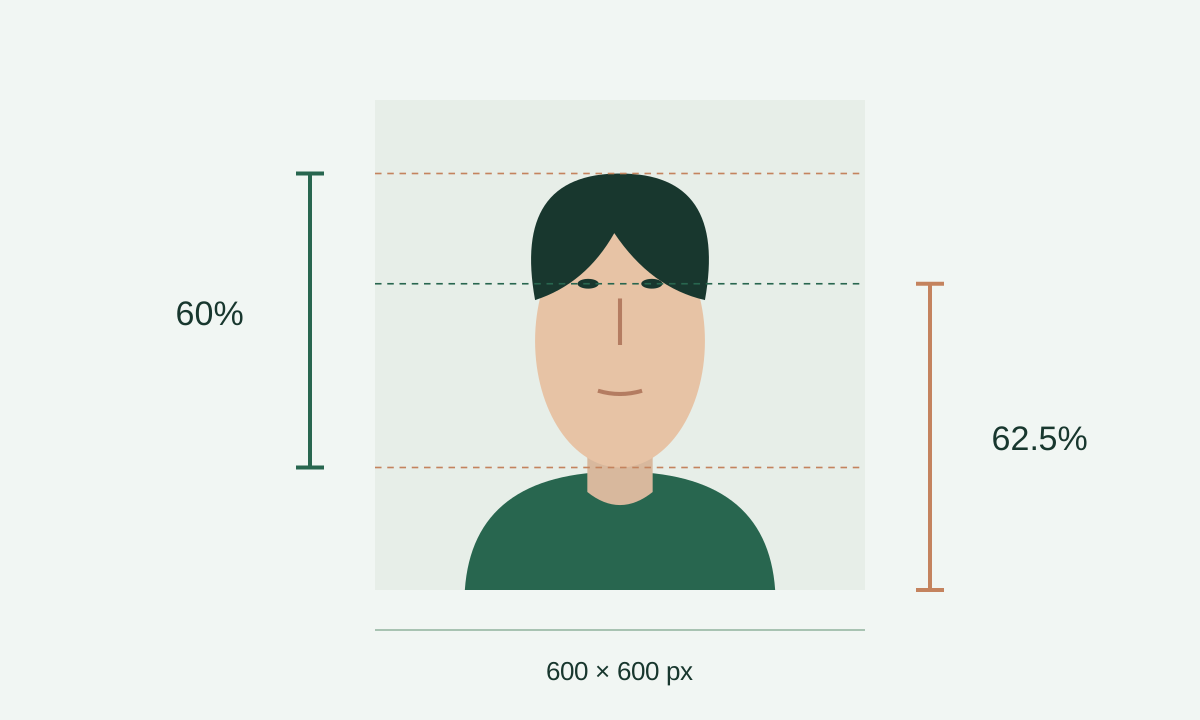
Start with the actual landmarks
Locate the highest visible hair, the bottom of the chin, and the eye line. The top guide belongs at the top of the head including hair, rather than the forehead or eyebrows. Automatic detection is a starting point. Inspect each guide carefully, especially with curly hair or a background close to the hair colour.
If the original has already cut off the hair, the missing position cannot be measured reliably. Ask for a wider original or retake the photo. Moving a guide to an imagined position does not restore missing content.
Government reference: Official composition template
Work through the head-height calculation
Suppose the distance from the highest hair to the bottom of the chin is 360 pixels in a final image 600 pixels tall. Calculate 360 ÷ 600 × 100: the head occupies 60%. The published range is 50–69%, equivalent to 300–414 pixels in this example.
If a tighter crop makes the head 450 pixels tall, the result is 75%. You need a wider crop from the original. Shrinking only the head or inventing space around it changes the picture instead of choosing a suitable composition.
Government reference: Official composition template
Measure eye height from the bottom
An eye line 225 pixels below the top of a 600-pixel image has 375 pixels beneath it. Its height from the bottom is 375 ÷ 600 × 100, or 62.5%. This is an example within the 56–69% range, rather than an additional mandatory target.
Moving the eyes upward within the frame increases this percentage. That can feel backwards if you are used to a ruler starting at the top of the screen. Read the label before adjusting the crop.
Government reference: Official composition template
Review both measurements together
After changing the crop size or position, check both the head and eye measurements. Bringing one into range is insufficient if the other moves out. Keep the full head centred and review the direction of the face and the visible shoulders.
Photos7 draws guides on the preview only; they are absent from the exported JPEG. Check their positions and inspect the downloaded file too. Correct geometry cannot establish when a photo was taken, assess every visual detail, or guarantee official acceptance.
Government reference: Official photo requirements
Frequently asked questions
Do I measure to the skull or to the highest hair?
Inspect the visible top of the head including hair, then the bottom of the chin. Do not move the guide to the forehead to obtain a convenient percentage. If the boundary is unclear, inspect the original at a larger size rather than relying on the automatic guide.
The percentages pass but the head is tilted. Will rotating the crop fix it?
A crop box does not change where the face points. Rotating a file can correct a saved orientation error, but cannot turn a sideways face into a front-facing portrait. Inspect the actual pose and request a retake when needed.
Why can I not make the crop any wider?
The editor has reached the pixels available in the original. Request a wider copy if a suitable frame would extend beyond them. Adding a white margin or inventing missing hair does not replace a useful original.
Is there one perfect number to aim for?
The published values are ranges, rather than a single target. Choose a clear composition within both ranges, keeping the full head centred. Chasing one number while overlooking shadows or the source quality does not improve the result.